
Do you need iPhone 17 for dual camera?
Apple Dual Capture is iPhone 17-only. Record front and back on older iPhones. See layouts, 1080p limits, then pick an app.

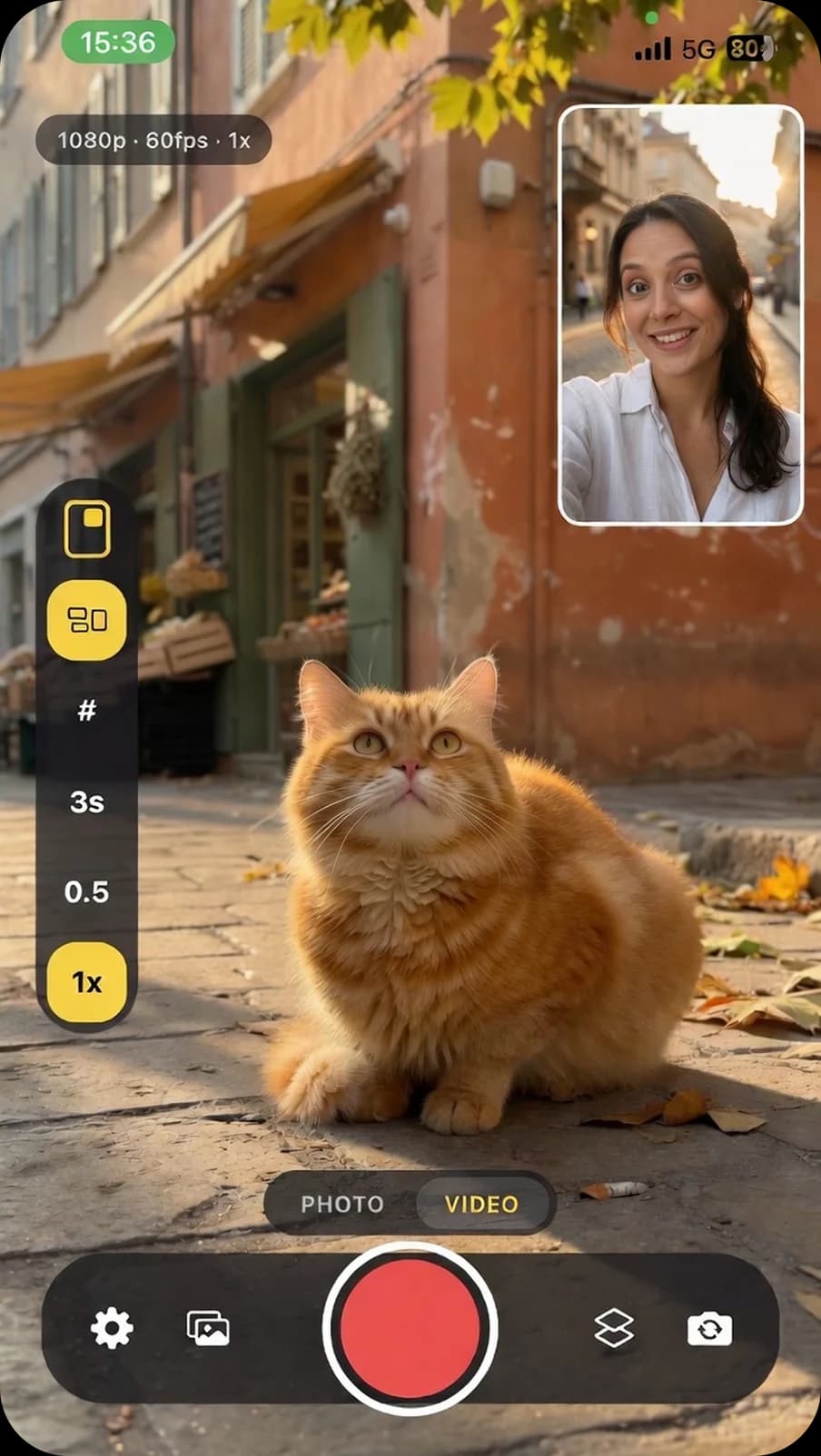
Do you need iPhone 17 for dual camera?
No. You do not need iPhone 17 to record the front and back cameras at the same time. Apple’s built-in Dual Capture — the Camera-app mode that puts a small front overlay on the rear — launched with the iPhone 17 line only: iPhone 17, 17 Pro, 17 Pro Max, and iPhone Air. That is a product SKU lock, not a hardware invention. iPhone has shipped MultiCam (two sensors in one session) since iPhone XS / iPhone 11-era chips. Third-party apps have used that API for years. If you still have an XS, 13, 15 Pro, or 16 Pro, a dual camera app can record both lenses today. Dual Capture is an Apple Camera feature, not a law of physics.
We know this because we ship Orbicam, a dual camera vlog app, against Apple’s MultiCam session — not against marketing copy. The rest of this guide is the distinction the SERP currently blurs: Dual Capture vs dual camera vs dual aspect, why 4K claims keep showing up, and which product is actually for Reels rather than GPS sports.
What is Dual Capture on iPhone 17?
Dual Capture is Apple’s name for a Video mode in the stock Camera app. Apple’s own iPhone User Guide describes it as recording yourself and the action in front of you at the same time, on iPhone 17, iPhone 17 Pro, iPhone 17 Pro Max, and iPhone Air. The layout is a locked picture-in-picture: front as the small overlay, rear filling the frame. There is no split, no interview stack, no discrete front file for later edit. Convenience is the point — no extra install, same Camera pipeline.
MacRumors and Apple’s guide agree on the steps: open Camera, Video, then Dual Capture. Reddit threads from the iPhone 17 launch also noted Apple has not enabled that Camera mode on older phones running the same OS. Hardware for two cameras has been in the silicon since 2019; the stock button is new. Cite the primary source, not an app blog: Apple Support — Record a video.
Which iPhones can record front and back at the same time?
Two different lists get mixed in “best dual camera app iPhone 17” posts. Keep them separate.
- Stock Dual Capture: iPhone 17, 17 Pro, 17 Pro Max, iPhone Air only.
- App dual camera via MultiCam: iPhone XS and later if
AVCaptureMultiCamSessionis supported. That includes 11–16 Pro. Orbicam uses that check, then falls back to a single camera with a warning. We do not draw a fake selfie box. - SplitRig’s public pages list iPhone 11 through 17 Pro and require a current iOS. That is their floor, not Apple’s MultiCam floor.
Dual camera vs Dual Capture vs dual aspect
Search results for “dual camera app” currently mix three products. Mixing them is how you buy a crop tool when you wanted a second lens.
| What people say | What it is | Example |
|---|---|---|
| Dual Capture | Stock Camera PiP, iPhone 17 line | Apple Camera |
| Dual camera | Two sensors, one take, PiP or split | Orbicam, DoubleTake, MixCam, SplitRig |
| Dual aspect | One lens, 9:16 and 16:9 files | DualFrame / “two formats” apps |
Mixcord’s September 2025 roundup ranked MixCam, Dualgram, DoubleTake, then BeReal and TikTok Live. BeReal is a daily dual photo. TikTok’s dual mode in that piece is Live, not a file you cut for Reels. Useful social history — not a dual camera recorder shortlist. Dualgram still works; its App Store page has not been the live conversation since 2022-era reviews.
Is dual camera 4K?
On iPhone, simultaneous MultiCam is an honest 1080p ceiling. Apple’s session does not give two 4K writers. Apps that say “4K dual camera” are usually describing a rear-only 4K mode, Dual Capture on iPhone 17, or a listing leftover. SplitRig is explicit that default dual capture is Full HD 1080p and that 4K is a rear option — that is the responsible version of the claim. Orbicam does not advertise 4K dual camera. 60 fps is Pro, and only when the session can hold it. Iron Stream drops 60→30→24 when the phone cooks, instead of killing the take until the OS is critical.
How the main dual camera apps actually differ
SplitRig currently owns the “best dual camera app iPhone 17” and “vs Apple Dual Capture” URLs. Their product is free, iOS-first, live composite, with GPS speed overlays, Face Mode, Watch, and AirPods remote. That is an action / sports recorder. If you want pace burned into the file, they are the honest pick — and they say Dual Capture is enough if you only want a locked PiP on an iPhone 17. Fair.
DoubleTake (Bending Spoons / FiLMiC) is the film-studio cousin: discrete files or a composite, independent AE/AF. MixCam is the long-running vlog subscription with Switch Screen. Those are real dual camera apps. They are not DualFrame. They are not BeReal.
Orbicam sits in the social dual-cam slice: front and back in PiP or split, Vlog, Reaction, Interview, or Focus, then 9:16 on stop and 16:9 from the gallery. Hybrid two-writer capture, compose after you stop — so dragging PiP does not have to burn a GPU overlay for the whole take. No account. No GPS. iPhone XS and later. Free is 45-second takes and 90 seconds a day with a badge; Pro is in-app on the App Store, not a web checkout. If that is your job (talking-head plus scene, post everywhere), Dual Capture’s locked PiP and SplitRig’s speedometer are the wrong tools even on an iPhone 17 Pro.
When Dual Capture is enough — and when it is not
- Use stock Dual Capture if you already have an iPhone 17-line phone, you want one locked PiP, and you do not want another app.
- Use a dual camera app if you are on XS–16, you want split or interview, you need discrete front/back files, or you want 9:16 and 16:9 from the same take.
- Use a sports dual-cam app if GPS overlays are the product. Orbicam will not add a speedometer to “keep up.” Heat is why we leave that off.
How Orbicam records both cameras
Most dual camera apps composite live: what you see is what gets burned to one file, overlays included. That is how GPS speedometers and Face Mode work, and it is also how phones cook on a long take. Orbicam writes two files (front and back) and composes after you stop. PiP position can change during the take without the GPU holding a live overlay for every frame. On stop you get a 9:16 composed clip for Reels, TikTok, and Shorts. From the gallery you export 16:9 for YouTube. Pro keeps the discrete front and back files on iOS. Free stays at 45 seconds a take and 90 seconds a day, with an ORBICAM badge. That quota is the trial — there is no separate App Store intro offer at launch.
If you only need Apple’s locked PiP and you already bought an iPhone 17, Dual Capture is enough. If you need split, interview, or both aspect ratios from one take, that is the job Orbicam is built for. Support is the store URL for restore and cancel.
Common questions
Record both. Post everywhere.
Orbicam is the dual camera vlog app for iPhone. No iPhone 17 required. Support.

Written by the Orbitensa team that ships Orbicam (bundle com.orbitensa.orbicam). Device lists follow Apple’s MultiCam API and Apple’s Dual Capture documentation, not App Store screenshots. If a store listing disagrees with a session we can run on device, the session wins.